A modern terminal and
AI-native IDE

Work with multiple agents in one place, without losing context.
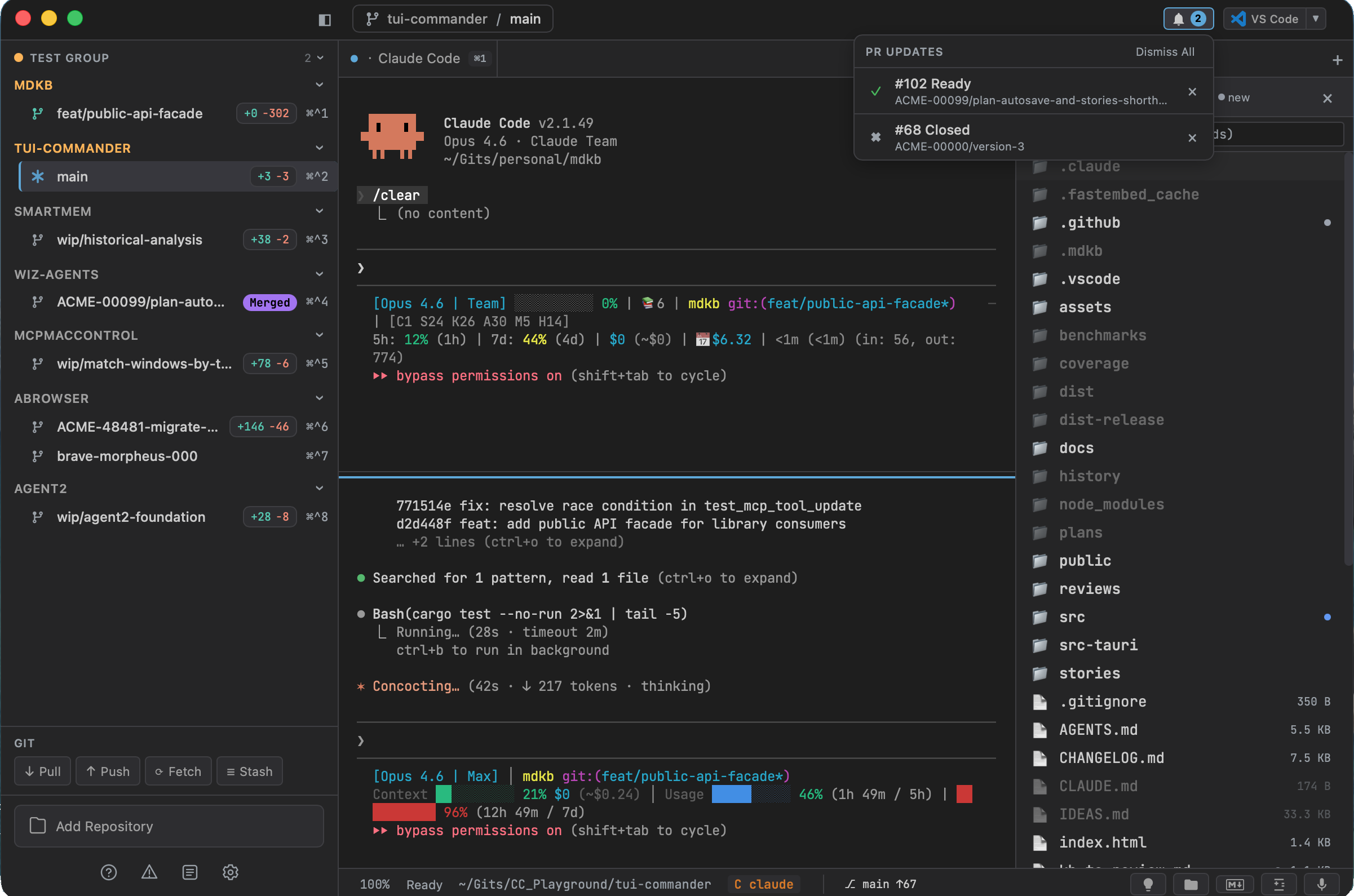
Agents, code, diffs, PRs, and CI status — all in a single workspace.

10 AI agents detected natively
Complete workspace — editor, Git, diffs, PRs
AI-native, not AI-assisted
TUICommander — multiple agents, split panes, sidebar with repos
macOS · Linux · Windows

Works with your favorite AI coding agents

TUICommander auto-detects 10 AI coding agents and understands what they're doing.

Claude Code
Gemini CLI
Codex
A
Aider
Amp
OpenCode
Jules
Cursor
Warp
Droid

One branch, one worktree, one world

Repository | |-- branch feature-auth | |-- worktree (isolated copy) | |-- terminal | |-- Claude Code Working... | |-- branch fix-payments | |-- worktree (isolated copy) | |-- terminal | |-- Claude Code ? Confirm (Y/n) | |-- branch refactor-api |-- worktree (isolated copy) |-- terminal |-- Claude Code Rate limited (4:32)

How it works

1

Add your repository

Point TUICommander at any Git repo — it becomes your workspace

2

Create feature branches

Click a branch — an isolated worktree is created automatically

3

Launch AI agents in parallel

Each agent runs in its own worktree — no conflicts, no context loss

4

Stay aware without checking

Rate limits, questions, and errors surface automatically — no hunting

5

Review and iterate

Diffs, PRs, CI status, and the editor — all in the same window

6

Merge and clean up

One-click post-merge cleanup — delete branch, archive worktree

Run many AI sessions in parallel

Launch Claude Code on five branches at once — or mix agents. Each session runs in its own Git worktree — no context collision, no lost threads, no "which terminal was that?" moments.

  • Up to 50 terminal sessions running simultaneously
  • Each session works on its own isolated copy of the repo
  • No stash conflicts, no branch switching, no waiting
  • Activity dashboard showing every session at a glance
BRANCH AGENT STATUS feature/auth Claude Code Working... fix/payments Claude Code ? Confirm (Y/n) refactor/api Claude Code Working... feature/search Claude Code Rate limited (4:32) wip/migration Codex Working...

Worktrees without the pain

"git worktree add ../feature-x origin/main && cd ../feature-x — every single time."

Click a branch in the sidebar. TUICommander auto-creates the worktree, opens a terminal inside it, and cleans up when the branch is merged.

  • Automatic worktree creation on branch click
  • Per-branch isolated environments
  • Automatic cleanup when branches are merged
  • Configurable base branch and setup scripts
Click branch |-- Worktree auto-created |-- Terminal opens inside | |-- Run Claude Code | |-- Split → Run another Claude Code |-- Switch branch | |-- Terminals preserved |-- Merge complete |-- Worktree auto-removed

Observe your AI agents

"Your agent hit a rate limit 10 minutes ago. You didn't notice."

TUICommander understands what your agents are doing. Rate limits, questions, errors, and idle states surface automatically — no hunting through terminal windows.

  • Detect active tasks, waiting input, rate limits, and idle agents
  • Provider-specific countdown timers for rate limits
  • Notification sounds and keyboard overlay when agents need input
  • Claude Usage Dashboard — rate limit bars, 7-day chart, 52-week heatmap
  • Activity dashboard showing all sessions at a glance
ACTIVITY DASHBOARD feature/auth Claude Working... bugfix/session Aider ? Confirm (Y/n) refactor/api Codex Working... feature/search Gemini Rate limited (2:41) wip/docs Amp Idle (5m)

See what your agents changed

"Check the diff in VS Code. Check PR status on GitHub. Check CI in another tab."

The feedback loop happens in the same window — diffs, PR status, CI results, code editing, and automatic CI failure recovery.

  • Diff panel — working tree or last 5 commits, click for inline diff
  • PR status badges (open/merged/draft), CI rings, review state, merge & approve from the app
  • GitHub Issues panel — filter by assigned/created/mentioned, labels with colors, close/reopen
  • Built-in CodeMirror 6 editor with syntax highlighting and disk conflict detection
  • CI Auto-Heal — fetches failure logs and injects them into your agent for automatic fix
CHANGED FILES +/- M src/auth/jwt.ts +42 -18 M src/auth/middleware.ts +15 -3 A src/auth/refresh.ts +67 D src/auth/sessions.ts -89 PR #247 Open CI ● Review: Approved

Manage worktrees visually

"I have 8 worktrees open. Which one has the PR approved? Which one is dirty?"

The Worktree Manager panel gives you a bird's-eye view of every worktree across all repositories — with PR state, dirty file counts, and one-click cleanup.

  • Visual overlay of all worktrees with PR status, dirty stats, last commit
  • Post-merge cleanup dialog — switch base, pull, delete branch, archive worktree in one click
  • Terminal auto-follows your cd — switch into a worktree and the tab reassigns
  • Auto-fetch on configurable interval (5/15/30/60 min)
WORKTREE MANAGER PR FILES myapp main — — feature/auth Open +3 bugfix/session Merged 0 refactor/api Draft +7 [Clean up merged] [Fetch all]

Talk to your agents

On-device speech-to-text powered by Whisper. No cloud, no API keys, no data leaving your machine.

  • GPU-accelerated on macOS (Metal), CPU fallback elsewhere
  • Push-to-talk hotkey — text injected into active terminal
  • 5 model sizes from tiny (75 MB) to large-v3-turbo (1.6 GB)

Control from anywhere

Mobile companion PWA with live agent status, suggest chips, and question banners. Access via LAN, Tailscale with auto-provisioned HTTPS, or an E2E-encrypted cloud relay — no VPN or port forwarding needed.

  • QR code scan for instant LAN connection
  • Tailscale integration with automatic HTTPS certificate provisioning
  • Cloud relay — AES-256-GCM encrypted, zero-knowledge server
  • Answer agent questions with one tap, track rate limits live

MCP Proxy Hub + Plugin system

One MCP connection for all your tools, plus an Obsidian-style plugin system with hot reload and a community registry.

  • MCP Proxy Hub — aggregate all MCP servers into a single endpoint for every agent
  • Circuit breakers, health checks, hot-reload, credential management
  • Plugin system with 4 capability tiers, terminal watchers, and regex triggers
  • Community registry — browse and install with one click
// my-plugin/index.js export function activate(host) { host.registerWatcher({ pattern: /error|fail/i, onMatch(line) { host.notify("Build failed!"); } }); }

Automate repetitive workflows

24 built-in Smart Prompts turn common tasks into one-click operations. Context variables like branch, diff, and PR data are resolved automatically — just click and go.

  • Smart Commit, Review Changes, Create PR, Fix CI — all one click
  • 31 context variables auto-resolved from git, GitHub, and terminal state
  • Inject mode (PTY write) or headless mode (one-shot subprocess)
  • Variable Input Dialog for any values that need manual input
  • Create your own prompts with the same variable system
// One click does all this: // 1. Resolves {branch}, {base_branch}, {commit_log} // 2. Injects into agent terminal: Create a GitHub pull request for branch feat/smart-prompts targeting main. Generate a descriptive title and description based on the commits: a1b2c3 feat: add variable dialog d4e5f6 feat: status banner g7h8i9 fix: palette naming Use `gh pr create`.

Customize your workflow

Rebind every shortcut, with chord support and conflict detection. The command palette gives fuzzy-search access to all actions.

  • Customizable keybindings with visual editor
  • 6 tab status dots — idle, running, unseen, awaiting, background, error
  • 31 Tips of the Day covering every discoverable feature

MCP Proxy Hub

Aggregate all your MCP servers into a single endpoint. Claude Code, Cursor, VS Code — each agent connects once and gets access to every upstream tool.

  • Auto-configures Claude Code, Cursor, Windsurf, VS Code, Zed, Amp, Gemini
  • Add or remove MCP servers without restarting anything
  • Circuit breakers, health checks, credential management, and hot-reload

How it compares

TUICommander complements your IDE — it doesn't replace it.

Capability tmux Warp Cursor TUICommander
Terminal sessions Yes Yes Yes Yes
AI coding agents No Partial Built-in Any agent (10 detected)
Parallel agents No No Limited Unlimited
Git worktree orchestration No No No Automatic
Agent observability No No No Real-time
Remote access (phone/tablet) SSH No No Built-in
Voice dictation No No Extension Local Whisper
E2E encrypted cloud relay No No No Built-in
MCP bridge (auto-config) No No No Zero-config
Plugin system No No Extensions Hot reload
MCP Proxy Hub No No No Built-in
GitHub Issues & PR management No No Extension Built-in
CI Auto-Heal No No No Built-in

And a full-featured terminal

Everything you'd expect from a modern terminal, plus a few extras.

50 sessions with independent zoom (8-32px)
Find in terminal — regex, case-sensitive, match nav
Session persistence — survives restarts
Branch panel — checkout, merge, rebase, push, pull
Repository groups — named, colored, collapsible
IDE launchers — VS Code, Cursor, Zed, Xcode
Command palette — fuzzy search all actions
Detachable tabs — float any terminal into its own window
N-way split panes — up to 6 panes, drag-resize, per-branch layout
13 bundled fonts — JetBrains Mono, Fira Code, and more
Claude usage dashboard — weekly limits, heatmaps
Smart Prompts Library — 24 built-in AI automation prompts + custom templates with auto-resolved context variables
Custom keybindings — rebind shortcuts, chord support, conflict detection
Tab status dots — 6 visual states: idle, running, unseen, awaiting, error
Post-merge cleanup — one-click branch delete, worktree archive
CWD tracking — tabs auto-follow when you cd into a worktree
GitHub Issues & PRs — unified panel with issue filters, labels, close/reopen, PR merge & approve
GitHub OAuth — Device Flow login, OS keyring storage, no PAT needed
CI Auto-Heal — fetches failure logs, injects into agent for automatic fix
File browser — tree/flat view, content search with regex, case-sensitive, whole-word
Markdown notes — interactive GFM checkboxes, live preview, write back to disk
Cross-repo knowledge — mdkb-powered search across all repos via MCP
Worktree agent bridge — spawn AI subagents in isolated worktrees via MCP

Frequently Asked Questions

Is it free?
Yes. TUICommander is Apache 2.0 licensed, open source, and free forever. No subscriptions, no feature gates.
Does it work on Windows and Linux?
Yes. TUICommander is cross-platform — macOS, Windows, and Linux. macOS builds are signed and notarized for one-click install.
Is this an IDE?
TUICommander is an AI-native IDE built on a modern terminal. It includes a code editor, file browser, diff views, Git panel, and PR management — everything needed for AI-assisted development. But unlike traditional IDEs, it's designed from the ground up for working with multiple agents as the primary workflow, not as an afterthought.
Can I use it without AI agents?
Yes. TUICommander is a powerful workspace on its own — 50 sessions, split panes, git worktrees, code editor, diff views, find-in-terminal, session persistence, and more. Agent awareness is a core capability, not a requirement.
Can I monitor agents from my phone?
Yes. TUICommander includes a mobile companion web app you can add to your home screen. See which agents need input, answer questions with one tap, track rate limits, and watch live output — all from your phone or tablet.
What happens when I restart the app?
Everything comes back. Terminals, tabs, split layouts, and scroll history are persisted across restarts. Agent sessions are detected automatically — you get a clickable banner to resume exactly where you left off.
How does voice dictation work?
Press a hotkey and talk. Your speech is transcribed locally and injected into the active terminal. Give detailed, nuanced prompts to AI agents in seconds instead of spending minutes typing. GPU-accelerated on macOS, no cloud service needed.
What's the MCP Proxy Hub?
Connect your MCP servers to TUICommander once, and every AI agent you run gets access to all of them automatically. No per-agent configuration. Includes circuit breakers, health checks, and hot-reload — add or remove servers without restarting anything.
Can I extend it with plugins?
Yes. TUICommander has an Obsidian-style plugin system with hot reload and a community registry. Plugins can watch terminal output, add status bar widgets, create panels, and respond to agent events. See the Plugin Authoring Guide.
How does the cloud relay work?
The relay is a lightweight WebSocket server that forwards encrypted messages between your desktop and phone. All traffic is end-to-end encrypted with AES-256-GCM — the relay server is zero-knowledge and never sees your data. The encryption key is derived from your token via HKDF and embedded in the QR code. You can self-host the relay or use the default at relay.tuicommander.com.
Is my data sent anywhere?
No. Zero telemetry, zero analytics, zero cloud dependencies. Everything runs locally on your machine. The only optional network calls are to GitHub's API (for PR badges), the plugin registry, and the cloud relay (if you enable it — all traffic is E2E encrypted).
Does it support Claude Code Agent Teams?
Yes. TUICommander automatically enables Claude Code's experimental Agent Teams feature. Tell Claude to "create an agent team" and each teammate spawns as a separate terminal tab. Teammates share a task list, message each other directly, and coordinate autonomously — all visible in your sidebar. No tmux or iTerm2 required.

Ready to work with AI agents without losing context?

New features land weekly. Apache 2.0 licensed, zero telemetry, runs locally.