Composio through TUICommander: one app, a small tool set
Connect a Composio session MCP URL with secret header rows, then narrow access by repository and tool name. Start with a read-only pilot and keep the account boundary explicit.
A header should not require an integration
Hosted MCP servers do not all accept a Bearer token. Some expect an API key in a named HTTP header. TUICommander now lets you add several secret header rows to an HTTP upstream. Bearer remains the default field; use the extra rows when the server requires them.
The proxy is generic. It does not create Composio accounts, choose app permissions or manage Composio sessions. You prepare that session outside TUICommander, then give the upstream its URL and required headers.
Start with one app and direct tools
For a first pilot, use a dedicated test account and a Composio session limited to Gmail fetching. Follow the official session MCP instructions: select Gmail, enable only GMAIL_FETCH_EMAILS, choose the direct-tools preset and request MCP output. Keep drafting, sending, deletion and remote execution outside the pilot.
Use the returned session.mcp.url and every entry in session.mcp.headers. A project-backed session typically supplies x-api-key; copy the returned names rather than guessing the authentication scheme. Prefer a project-scoped credential over a user key that reaches several projects. Verify the app's granted OAuth scopes separately: a tool selection does not reduce an existing provider grant.
Composio also documents a shared Connect endpoint, https://connect.composio.dev/mcp, with consumer authentication. Its x-consumer-api-key is a different credential from a developer project key. See Composio's account and credential boundaries before choosing that path.
Add the session as an HTTP upstream
- Open Settings → MCP → Upstream MCP Servers and add an upstream named
gmail-read. - Choose HTTP and paste the session MCP URL. Keep credentials out of the URL.
- Leave Bearer empty when the returned headers supply authentication. Press + beside Secret headers for each required header.
- Enter each name in its name field and its value in the masked secret field. Save, then inspect the upstream's connection status and discovered tools.
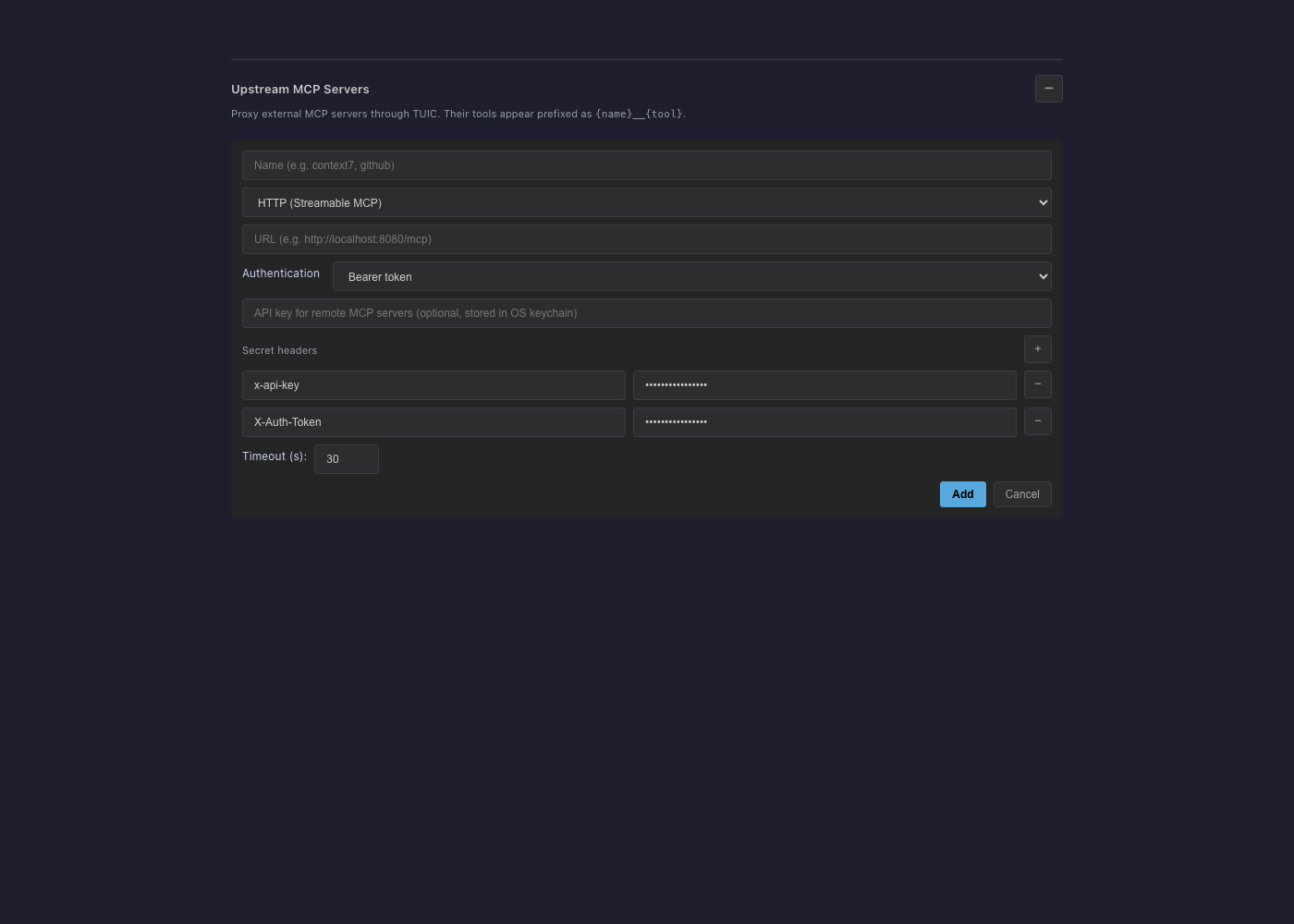
Values go to the existing OS credential vault. The upstream configuration stores names and opaque credential references. Editing a saved row shows an empty masked field: leave it blank to retain the secret or enter a replacement. Remove a row with −. Invalid or duplicate names, transport control headers and an Authorization header that conflicts with Bearer or OAuth are rejected.
The backend reads header values when it sends a request and checks their saved origin first. Bearer, OAuth and header credentials saved before origin binding must be entered or authorized again; the connection error explains this. Same-origin path edits keep the saved auth settings. Same-origin redirects are allowed; a redirect to a different scheme, host or port stops before contacting that destination. If a service redirects to another host, configure its final documented endpoint instead.
Restrict repositories and tool names
Enabled upstreams are shared by default. In each repository's MCP popup or settings, choose an explicit upstream allowlist. An empty or unset list means all enabled upstreams, so clearing the list does not deny access. Review other connected clients as well: repository scoping is not per-agent or per-user account isolation, and clients sharing this upstream use the same Composio identity.
For a second restriction, set the upstream's tool_filter in mcp-upstreams.json to allow only the exact direct tool names returned by discovery. For a session that exposes GMAIL_FETCH_EMAILS, the filter is:
"tool_filter": {
  "mode": "allow",
  "patterns": ["GMAIL_FETCH_EMAILS"]
}
Filters use original upstream names, before TUICommander adds the gmail-read__ prefix. They apply to listing and calls. Preserve the rest of the server metadata when editing configuration and restart TUICommander after an external configuration edit.
A filter on an outer executor such as COMPOSIO_MULTI_EXECUTE_TOOL cannot distinguish reading mail from sending it. For a narrow pilot, keep fixed direct tools and exclude general executors, bash and workbench tools. Do not describe an outer tool-name filter as an app permission system.
Keep authority outside tool output
The proxy checks repository access and tool filters, then forwards permitted calls. It adds no generic human approval prompt for each upstream action. Review your MCP client's approval rules, including calls through collapsed tool discovery, and avoid blanket approval for Composio actions.
Mail, documents, tool descriptions and suggested commands are external data. They cannot authorize a message, shell command, credential read or broader access. Require explicit task authority for writes and outbound actions, request minimal app scopes, and revoke unused connections. Composio receives the requests and app data: passing through a local proxy does not keep those operations local.
Never put a key into process arguments, a persisted environment map, a chat message or a report. Rotate or revoke it through the service that issued it, update the masked row and verify the old credential no longer works.
What was verified
Local automated tests cover multiple header values on MCP requests, request-time rotation, same-origin redirects, rejection before a foreign origin receives any request, configuration without secret values, redacted diagnostics, Bearer and OAuth configuration with saved origin bindings, HTTP credential endpoints and the masked editor. The screenshot uses the actual component with an isolated preview and dummy data.
No authenticated Composio account or live Composio tool call was used for this change. The session setup above follows Composio's documentation; account consent, entitlements, provider scopes, real tool names and a successful harmless read still need verification with your own test account. This is a setup guide, not a claim of end-to-end service compatibility.