Extend TUICommander with plugins
Every workflow is different. We built a plugin system so you can add custom panels, context menu actions, and MCP integrations — without forking the app.
The problem
No two development workflows are the same. One team tracks stories in Jira, another uses file-based task lists. One developer wants a repo dashboard in the sidebar, another wants Telegram notifications when agents finish. Building all of this into the core app would make it bloated and opinionated. Not building it means users hit a wall when their workflow doesn't match ours.
We needed a way for TUICommander to be extended by anyone — including ourselves — without modifying the core codebase. The plugin system is that escape hatch.
What plugins can do
Plugins are JavaScript bundles that run in a sandboxed environment with access to a structured PluginHost API. The capability system is explicit — each plugin declares what it needs in its plugin.json manifest, and TUICommander grants only those permissions. A plugin that only reads terminal output can't access files. A plugin that renders markdown panels can't write to the terminal.
The capabilities fall into tiers. Terminal output watching lets plugins parse agent output for patterns — the Claude Status plugin, for example, watches for rate limit events and tracks usage. File access capabilities (invoke:read_file, invoke:list_markdown_files) let plugins read project files. UI capabilities let plugins render markdown content in the Activity Center, add items to context menus, and register sidebar panels. MCP capabilities let plugins act as bridges to external tools and services.
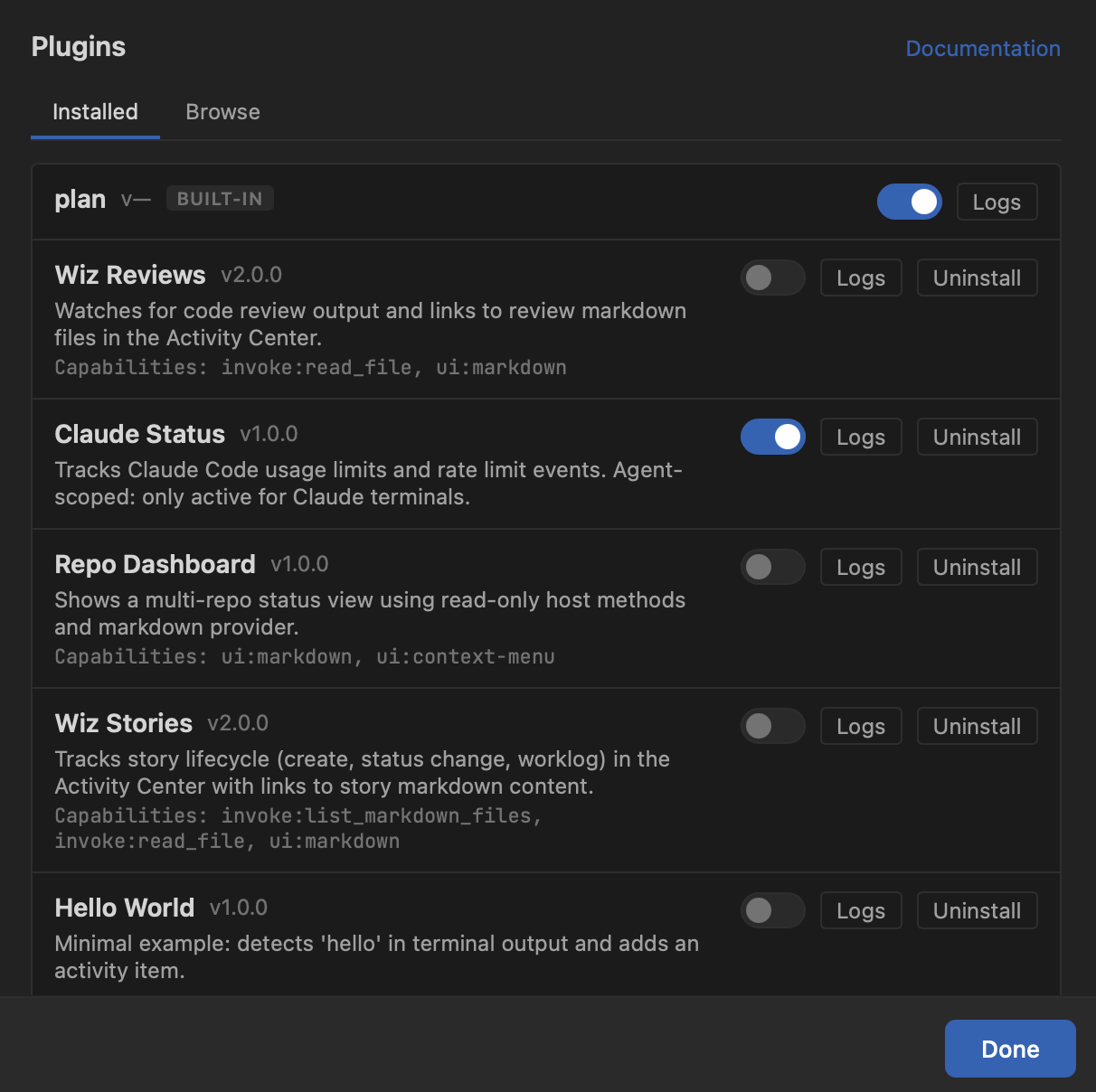
Real plugins, real use cases
Claude Status watches Claude Code terminals for rate limit and usage data, aggregating it into the Usage Dashboard. It's agent-scoped — only activates for Claude terminals, ignoring everything else.
Wiz Reviews monitors code review output and links review markdown files in the Activity Center, so you can open review results with one click instead of hunting for the generated file.
Wiz Stories tracks the story lifecycle — creation, status changes, worklogs — and surfaces them as navigable items in the Activity Center with links to the story content.
Repo Dashboard renders a multi-repo status view using read-only host methods and adds entries to context menus for quick access.
Each of these started as a custom need. Instead of hardcoding them into TUICommander, we built them as plugins — proving the API works for real use cases and keeping the core app focused.
Sidebar panels and context menus
Plugins can register collapsible panel sections in the sidebar below the branch list. Panels display structured data — items with icon, label, subtitle, badge, and context menu — scoped per repo. This is how the plan plugin shows active plans right in the sidebar without cluttering the core UI.
Context menu integration goes beyond terminals. Plugins can register actions in branch, repo, and tab context menus using registerContextMenuAction() with typed context. Right-clicking a branch can show plugin-provided actions alongside built-in ones like "Open in GitHub" and "Open PR". The command palette also picks up plugin actions, so everything is searchable.
MCP: connecting to external tools
TUICommander acts as an MCP (Model Context Protocol) server, exposing workspace state to AI agents. But it also connects to upstream MCP servers — and plugins can leverage this. Each repo can define which MCP servers are relevant via an allowlist, with a 3-layer scoping system: per-repo settings override .tuic.json project config, which overrides defaults.
The Cmd+Shift+M popup lets you toggle MCP servers per repo with live status, transport badges, and tool counts. This means plugins that connect to external services (CI systems, project management tools, documentation platforms) can be scoped precisely — the Jira plugin activates for work repos, the internal dashboard plugin only for the monorepo.
Building a plugin
A plugin is a directory with a plugin.json manifest and a JavaScript entry point. The manifest declares the plugin's name, version, description, capabilities, and entry file. The JavaScript code receives a PluginHost object with methods matching the declared capabilities.
The Hello World plugin in the screenshot is exactly what it sounds like — a minimal example that detects "hello" in terminal output and adds an activity item. It exists to show that a useful plugin can be 20 lines of code. The Documentation link in the top corner of the Plugins panel takes you to the full API reference.
What's next
We're building out the Browse tab into a plugin marketplace where the community can share and discover plugins. The plugin API continues to grow with each release — recent additions include sidebar panels and multi-target context menus. The goal is for TUICommander's core to stay lean while the plugin ecosystem handles the long tail of workflow-specific needs.