One sidebar, all your repos
When you work across 10+ repositories every day, you need a single place to see branches, worktrees, PRs, and diff stats — without switching tools.
The problem
Most developer tools assume you work on one repo at a time. Your terminal is in one directory. Your git GUI shows one project. When you want to check the PR status on a different repo, you switch context — open GitHub, find the repo, find the PR, remember what you were doing before.
If you're running AI agents across multiple projects (which is what TUICommander is built for), this context switching multiplies. You have agents working on different branches across different repos, each with their own PRs, their own diff stats, their own worktrees. Keeping track of all of it in your head doesn't scale.
A workspace, not a file browser
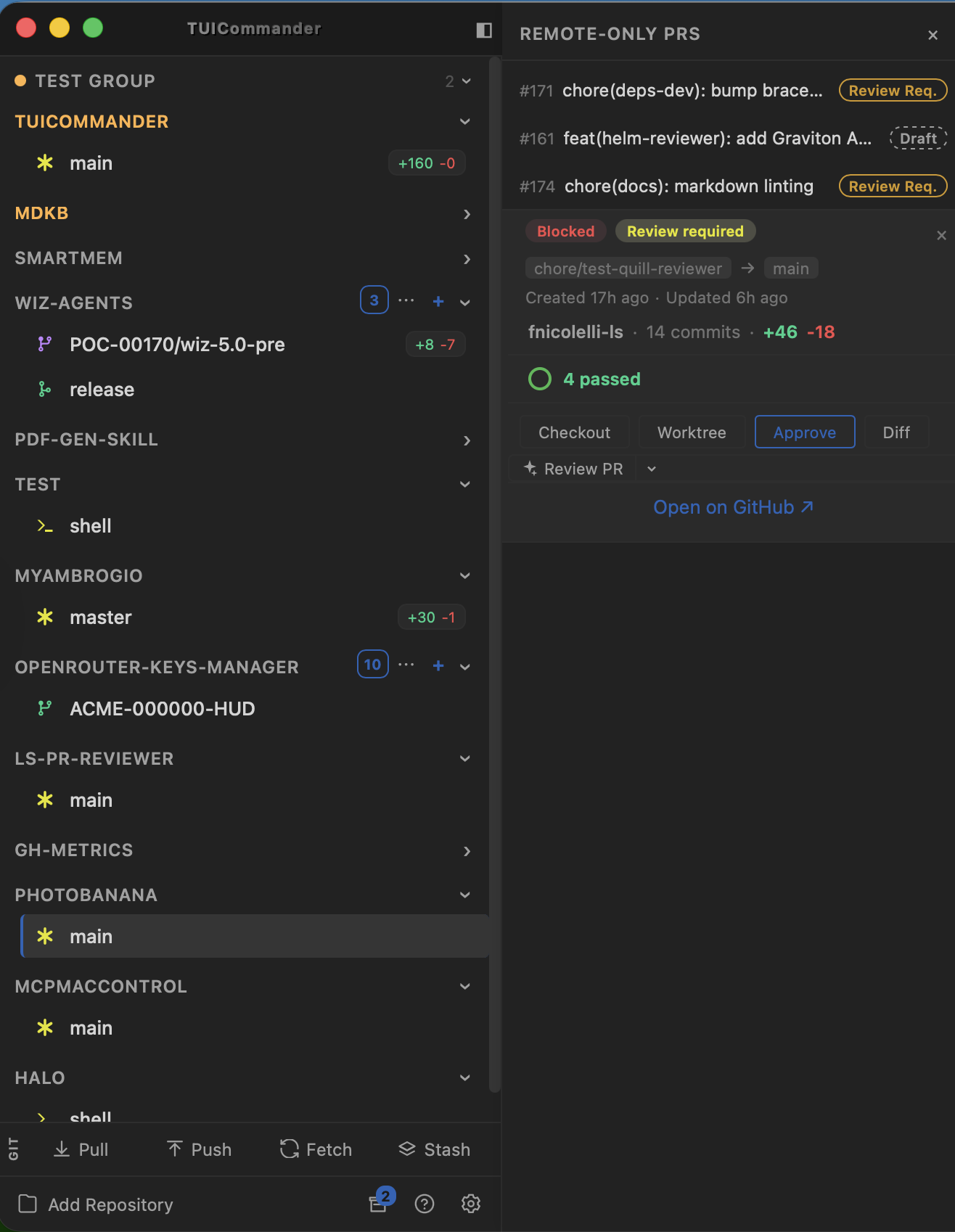
The TUICommander sidebar isn't a file tree. It's a workspace view — every repo you've added is listed with its branches, worktrees, and live status. At a glance you see which branch is active, how many lines changed (the green and red badges), how many open PRs a repo has, and whether agents are running.
Repos are grouped visually. Each one is a collapsible section showing its branches. Worktree branches get a distinct icon so you can tell them apart from regular checkouts. Clicking a branch switches your terminal context to that repo and branch instantly — terminals are scoped per branch, so your session state follows.
PR management without leaving the terminal
This is where it gets practical. Every repo with open PRs shows a PR count badge. Click it, and you get a PR panel listing all open pull requests with their status: draft, review requested, blocked, CI results. Select a PR and you see the full detail — author, commit count, additions/deletions, CI checks, review state.
But the panel isn't just for reading. You can act directly: Checkout the PR branch. Create a worktree for it (isolated copy, no need to stash your current work). Approve it. View the diff. Trigger a Smart Prompt to review the code. Open it on GitHub. All from the same panel, without opening a browser or running git commands manually.
Branch operations at your fingertips
Right-clicking a branch opens a context menu with everything you'd normally do through git commands: create a new branch, delete, rename, push, pull, rebase from base branch, open in GitHub, open the PR if one exists. The "Update from base (rebase)" action knows which branch is your base because TUICommander tracks base refs — no need to remember if you branched from main, develop, or a release branch.
Creating a new branch shows an inline form right in the sidebar with a base ref selector. You pick your base from grouped Local/Remote refs (it auto-fetches remote refs before showing the list), name your branch, and it's created. No terminal commands, no typos.
Worktrees as first-class citizens
Git worktrees let you have multiple branches checked out simultaneously in separate directories. TUICommander makes them a core workflow: create a worktree from any branch (including PR branches), and it gets its own isolated copy of the repo. Your agents can work on different branches in parallel without stepping on each other.
In the sidebar, worktree branches are visually distinct — they show a fork icon instead of the regular branch icon. The bottom toolbar gives you Pull, Push, Fetch, and Stash for the active repo. And the "Add Repository" button at the bottom lets you grow your workspace as your projects evolve.
What this enables
The sidebar turns TUICommander from a terminal multiplexer into a development control center. You sit down, scan 12 repos in 3 seconds: which branches have uncommitted changes, which PRs need review, which agents are still running. Then you act — checkout, review, merge, create worktrees — without leaving the app. The terminal stays focused on what terminals do best: running agents and commands. The sidebar handles the rest.